
programmatic

Tableau Consulting Services

Tableau that answers questions, not just decorates decks.

Our Tableau consulting services cover dashboard development, workbook performance tuning, Tableau Server and Tableau Cloud administration, migration, governance, row-level security, and analyst enablement. We focus on the decisions your teams need to make, then build the dashboards, data models, and controls required to support them — without adding another layer of reporting nobody trusts.

Tableau executive dashboard built by Programmatic — governed data sources, sub-2s load

Works with the data stack behind Tableau

Tableau Cloud
Snowflake
Databricks
BigQuery
dbt

Inside the delivery

Tableau analysis with governed sources and usable workbooks

Map source grain, user questions, refresh requirements and existing workbook dependencies. The flow below shows the main delivery stages and the evidence produced at each step.

Reference approachAdapted during discovery
  1. 01

    Source and audience

    Map source grain, user questions, refresh requirements and existing workbook dependencies.

    Output

    Tableau data and workbook assessment

  2. 02

    Published data design

    Define relationships, calculations and reusable published sources with access boundaries.

    Output

    Governed data sources and calculation definitions

  3. 03

    Workbook experience

    Build views, filters and dashboard actions around clear comparison and navigation tasks.

    Output

    Tableau workbook and interaction design

  4. 04

    Publish and validate

    Reconcile measures and test extract schedules, permissions and query performance.

    Output

    Publishing checklist and workbook support notes

Controls across the workflow

  • Published definitions
  • Permission checks
  • Extract ownership
  • Query performance

Decisions that shape the scope

Should a workbook use live queries or extracts?
Choose from freshness, source load, query speed and access requirements. Live connections depend on source performance; extracts need refresh ownership, storage and a clear statement of data freshness.
What does Tableau consulting include?
It can include Tableau Cloud or Server architecture, data-source design, dashboard development, calculations, permissions, governance, performance tuning, embedded analytics, migration, training, and ongoing support.

Before you commit

Is this the right engagement?

What we need from you
Workbooks, source access, Tableau Cloud or Server setup, audience roles, refresh expectations and performance issues.
How you accept the work
Reconcile measures and test extract schedules, permissions and query performance. Acceptance records the tested scope, unresolved issues and the owner's decision.
Scope & alternatives
Choose from freshness, source load, query speed and access requirements. Live connections depend on source performance; extracts need refresh ownership, storage and a clear statement of data freshness.

Overview

Tableau consulting for governed data sources, interactive analytics, performance, and scalable publishing

Programmatic delivers Tableau across architecture, governed data sources, calculations, dashboard and workbook design, Tableau Cloud or Server operations, permissions, performance, embedded analytics, and migration. The aim is self-service exploration with enough shared modeling and governance that teams can trust the results.

  • 01Tableau Cloud and Server architecture
  • 02Published and governed data sources
  • 03Interactive dashboards and analytical workflows
  • 04Calculations, parameters, sets, and level-of-detail logic
  • 05Permissions, content governance, and deployment practices
  • 06Performance tuning, embedded analytics, and migration

Benchmark

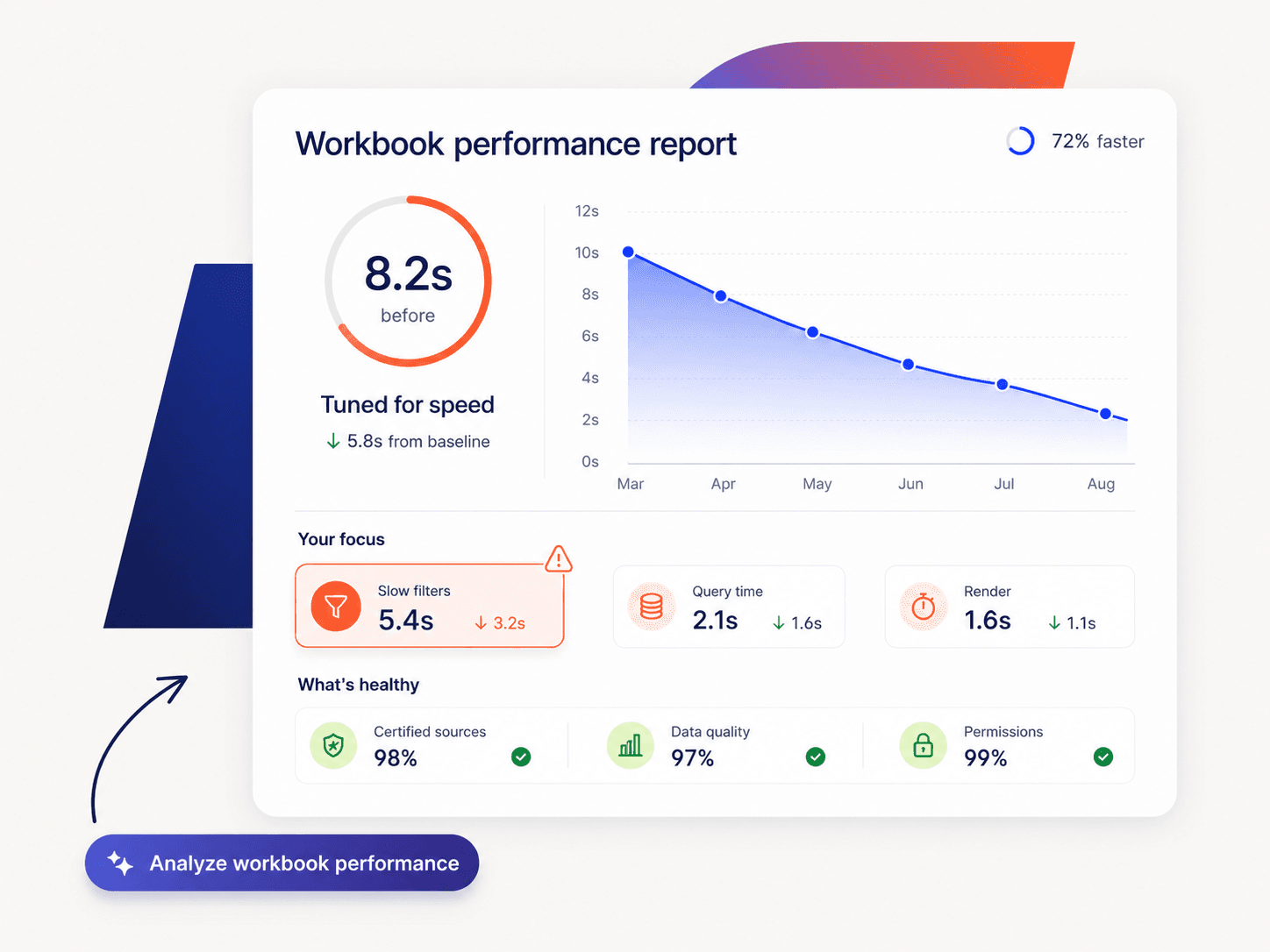
Performance tuning is measured with before-and-after workbook load times, with findings documented for each engagement.

Capabilities

Engineering scope and deliverables

Select the work that addresses your constraint. Responsibilities and acceptance criteria are agreed before delivery.

01

Tableau architecture

Design sites, projects, environments, connectivity, refresh, ownership, and deployment around the way teams publish and consume analytics.

  • Cloud or Server architecture
  • Project and site structure
  • Connectivity and refresh
  • Environment and release strategy
02

Governed data sources

Create reusable published data sources and modeling conventions so core business definitions are not rebuilt independently in each workbook.

  • Source design
  • Extract and live-connect choices
  • Reusable dimensions and measures
  • Certification and ownership patterns
03

Dashboard and workbook design

Build exploratory and operational experiences around real questions, with intentional interactions and navigation rather than maximum visual density.

  • Dashboard hierarchy
  • Filters and actions
  • Drill and navigation
  • Role-specific analytical flows
04

Advanced Tableau calculations

Implement calculations with clear definitions and testability across dimensions, filters, and aggregation levels.

  • LOD expressions
  • Table calculations
  • Parameters and sets
  • Business-rule validation
05

Governance and permissions

Organize content, access, ownership, refresh, publishing, and lifecycle so self-service does not become unmanageable workbook duplication.

  • Project permissions
  • Publishing standards
  • Content lifecycle
  • Ownership and documentation
06

Performance and migration

Profile slow workbooks, sources, extracts, and server behavior, and rationalize legacy content during upgrades or platform migrations.

  • Performance recording
  • Extract optimization
  • Workbook simplification
  • Migration and validation

Comparison

Tableau vs Power BI vs spreadsheets: where each fits

CriteriaSpreadsheetsTableauPower BI
Exploratory visual analysisFlexible for small datasets, but increasingly manual at scaleExcellent for interactive visual exploration and analyst-led discoveryStrong visual analysis with close integration into the Microsoft ecosystem
Cost at scaleLow software cost, but significant manual effort can accumulateLicensing can become significant as user counts growOften attractive for organizations already invested in Microsoft licensing
Best-fit environmentIndividual analysis and lightweight operational workAnalyst-heavy teams and organizations with established Tableau environmentsMicrosoft-centric environments using tools such as Azure and Microsoft Fabric
Governed analyticsDifficult to control across shared files and duplicated versionsSupported through managed data sources, permissions, and governance standardsSupported through semantic models, workspaces, permissions, and governance controls
When we would consider itKeep for lightweight individual tasks, not as the reporting backboneChoose when visual exploration, existing Tableau investment, or analyst flexibility mattersChoose when Microsoft integration and platform economics are stronger priorities

Scroll horizontally to view the full comparison on smaller screens.

Pricing

Engagement options and pricing factors.

We use fixed pricing for clearly scoped Tableau projects and monthly delivery models for ongoing development, administration, and optimization. Before recommending additional licenses or infrastructure, we review the existing environment, user requirements, and delivery model so the engagement is sized around what your team actually needs.

01

Workbook performance rescue

Diagnose and optimize a high-priority workbook, including documented findings, recommended changes, and before-and-after performance testing.

02

Tableau migration project

Tableau Server to Cloud or another BI platform to Tableau, covering inventory, dependencies, migration planning, validation, and cutover.

03

Analytics delivery pod

Ongoing Tableau development, administration, governance, optimization, and analyst support delivered as a dedicated monthly engagement.

Integrations

Selected for your environment

Tools are chosen around your existing systems, access requirements and operating constraints.

Tableau Cloud
Tableau Server
Snowflake
Databricks
BigQuery
SQL Server
Postgres
dbt
Salesforce
Excel

Frequently asked questions

Questions to resolve before starting

01

Should a workbook use live queries or extracts?

Choose from freshness, source load, query speed and access requirements. Live connections depend on source performance; extracts need refresh ownership, storage and a clear statement of data freshness.

02

What does Tableau consulting include?

It can include Tableau Cloud or Server architecture, data-source design, dashboard development, calculations, permissions, governance, performance tuning, embedded analytics, migration, training, and ongoing support.

03

Can you improve existing Tableau workbooks?

Yes. We can review calculation complexity, data-source design, filters, extracts, custom SQL, workbook layout, interactions, and platform behavior to improve usability and performance.

04

Should teams use live connections or extracts?

The choice depends on source performance, freshness requirements, data volume, concurrency, security, and operational constraints. We test the workload rather than assuming one connection mode is always better.

05

How do governed Tableau data sources help self-service?

Published reusable sources give analysts common definitions, joins or relationships, calculations, ownership, and access patterns while still allowing users to build their own views.

06

Can you implement Tableau embedded analytics?

Yes. We can design embedded dashboards and interactions around the host application's identity, permissions, user experience, data access, and performance requirements.

07

How do you tune Tableau performance?

We use workbook and platform evidence to inspect source queries, extracts, calculations, filter behavior, dashboard complexity, rendering, and concurrency before choosing optimizations.

08

Can you migrate Tableau content to or from another BI platform?

Yes. We inventory content, metrics, users, access, and dependencies, rationalize what should move, validate calculations and security, and phase the migration to reduce reporting disruption.

09

What should we prepare for the first technical discussion?

Workbooks, source access, Tableau Cloud or Server setup, audience roles, refresh expectations and performance issues.

10

What evidence is available at handover?

The agreed delivery includes publishing checklist and workbook support notes. Reconcile measures and test extract schedules, permissions and query performance.

11

How is the engagement estimated?

We review the available inputs before estimating: Workbooks, source access, Tableau Cloud or Server setup, audience roles, refresh expectations and performance issues. The proposal identifies dependencies, review milestones and excluded work; the scope determines the schedule.

Start a conversation

Discuss your next technical step

Share your current situation and the constraint you need to resolve. We will use the discovery inputs above to define a practical scope for Tableau Consulting Services.